With the increasing prevalence of working from home, many employees face new ergonomic challenges. Lack of or inadequate infrastructure, such as comfortable chairs and desks, and prolonged periods of maintaining unnatural postures, such as spinal curvature or incorrect arm positioning, can lead to repetitive strain injuries (RSI) and work-related musculoskeletal disorders (WMSD).
In today’s article, Cascoca will explain how to design a home office space effectively to help prevent these problems and ensure comfort, health, and well-being.
Ergonomics is the science of adapting the physiological, environmental, and cognitive conditions of the human body to improve comfort, safety, and productivity. It extends beyond the workplace to encompass everyday life and leisure, contributing to improved well-being and quality of life.
Applying ergonomic principles in a home office is crucial for minimizing the risk of injury. Ergonomics is not limited to furniture and equipment; it also includes the design and layout of the work environment.
Ergonomics without working from home

An ergonomic work environment offers numerous benefits for health and productivity.
Proper application of ergonomics can reduce muscle pain and eye strain. Correct posture and suitable furniture can prevent excessive strain on joints and the spine.
A more comfortable work environment can improve employee attendance and work efficiency, directly boosting productivity.
Another important benefit is reduced healthcare and sick leave costs, as prevention is more effective than treatment.
Working from home can be challenging for those without dedicated workspaces and suitable equipment. Many people use makeshift furniture such as dining tables or sofas, but this can negatively impact posture and comfort.
Furthermore, insufficient lighting and prolonged screen time increase the risk of eye strain and muscle tension. If left unaddressed, these factors can lead to repetitive strain injury (RSI) and musculoskeletal disorders (WMSD).
Considering ergonomic design is crucial for preventing long-term health problems. Here are some key aspects:
Suitable Furniture
Choosing ergonomic furniture is essential. Office chairs must be height-adjustable, equipped with armrests, and have a backrest that supports the lumbar spine.
The height of the desk must be sufficient to allow the elbows to form a 90-degree angle, preventing shoulder fatigue. Work Equipment Placement
The monitor should be placed at eye level, approximately 50-70 cm from the face, to reduce eye strain.
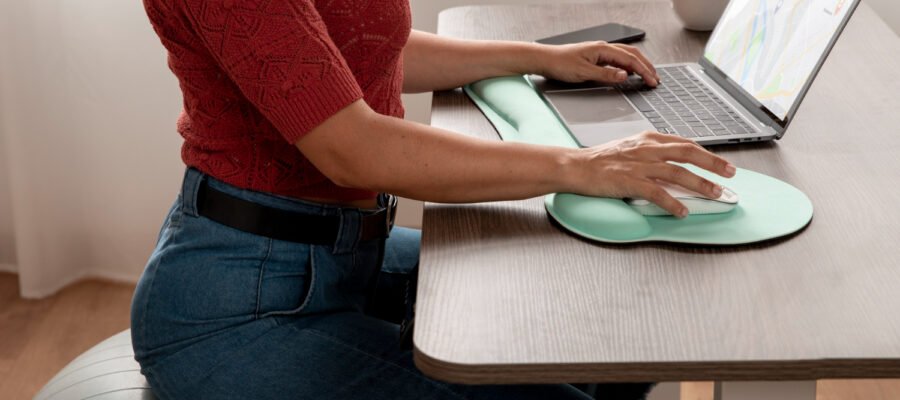
The keyboard should be positioned so that the wrists remain in a straight line, and the mouse is within easy reach without requiring excessive arm extension.
Adequate Lighting
Natural light is best. If unavailable, use soft, directional lighting. Avoid screen glare and ensure a balance between ambient and task lighting to reduce eye strain.
Space Design
The room layout must be well-planned to ensure good freedom of movement. The workspace should be logically laid out, ensuring all necessary items are within easy reach and avoiding repetitive or uncomfortable movements.
Assistive Technologies
Use ergonomic laptop stands, keyboard stands, and mouse stands. These accessories help maintain correct posture and reduce the risk of muscle strain.
Repetitive strain injury/musculoskeletal disorder (RSI/WMSD) is caused by repetitive improper movements and prolonged maintenance of poor posture.
Therefore, adjusting the size of the workspace as needed is crucial to avoid these problems. For example, the appropriate height of desks and chairs can prevent pressure on the spine and joints.
Chairs with lumbar support can reduce lower back pressure, while a properly positioned keyboard and mouse can prevent wrist and elbow problems.
In addition to creating good ergonomic design, users should be encouraged to develop good habits in their daily work to improve the ergonomic environment of their home office.
Regularly adjusting the height of chairs, desks, and monitors is crucial for maintaining comfortable posture and protecting joints. Taking active breaks every 30-60 minutes can relieve muscle tension and promote blood circulation.
Eye relaxation exercises, such as looking at distant objects and blinking frequently, can also reduce eye strain, thus contributing to a healthier and more sustainable work environment.
Conclusion
The rise of remote work has transformed the way many people organize their daily routines, making the home office an essential part of modern living. While working from home offers flexibility and convenience, it also introduces new ergonomic challenges that can negatively affect health if not addressed properly. Inadequate furniture, poor posture, and long hours spent in front of a computer without proper support can lead to discomfort, fatigue, and even long-term conditions such as repetitive strain injuries (RSI) and work-related musculoskeletal disorders (WMSD).
Designing an effective home office is therefore essential for maintaining both productivity and well-being. A well-planned workspace should prioritize ergonomics, ensuring that the desk, chair, and computer setup support natural body alignment. An adjustable chair with proper lumbar support, a desk at the correct height, and a monitor positioned at eye level can significantly reduce strain on the neck, shoulders, and back. These simple adjustments help maintain a healthy posture throughout the workday and prevent unnecessary stress on the body.
In addition to ergonomic furniture, organization and layout also play an important role in creating a comfortable home office. A workspace that allows enough room for movement and keeps essential items within easy reach helps reduce repetitive and awkward motions. Proper lighting is equally important, as it prevents eye strain and improves concentration. Natural light, when available, can create a more pleasant working environment and contribute to overall well-being.
Regular movement and breaks are another key factor in preventing physical discomfort. Even with an ergonomic setup, remaining seated for extended periods can negatively impact circulation and muscle health. Taking short breaks to stretch, walk, or change posture throughout the day can help relieve tension and maintain energy levels. Incorporating small moments of movement into the daily routine supports both physical health and mental focus.
Ultimately, creating a well-designed home office is an investment in long-term health and productivity. By paying attention to ergonomics, workspace organization, and healthy work habits, individuals can reduce the risk of injuries and maintain a more comfortable working environment. As remote work continues to become more common, thoughtful home office design will play an increasingly important role in ensuring that working from home remains both efficient and beneficial for overall well-being.
latest post

Furnishing a villa in Mogoșoaia for a family with three children

Stoneware and Terracotta in Neutral Shades

The Loft – an unconventional space created by Beelive

How did you discover your inclination towards the field of interior design?

Complex offer for beneficiaries

Kitchen tile and tile combinations

Choose the perfect idea to furnish your bathroom

How to correctly mount a decorative plinth

How to choose a background in the Room function